DuckDB: A Game Changer For Data Analytics
· 8 min read
When analysts work with data, they typically switch among several tools. Spreadsheets like Excel or Google Sheets are handy for quick summaries, but they struggle once you move past a few hundred thousand rows and need to join between different tables. Visual BI platforms such as Power BI and Tableau provide code-free dashboards, yet they obscure the underlying transformations. Code-centric libraries like pandas, Polars, or the tidyverse give you complete control but hold all data in memory so that large datasets can exhaust RAM. And for truly massive workloads, there’s Apache Spark and other distributed engines, which can process terabytes but require cluster management.
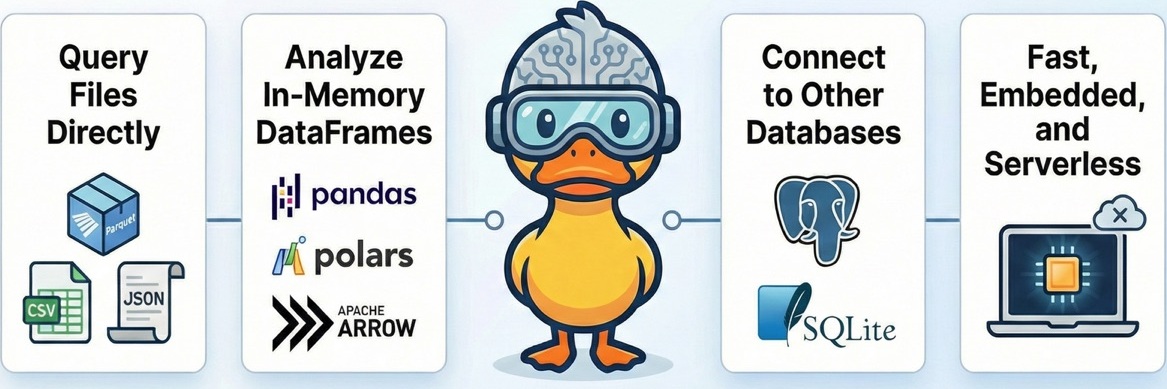
DuckDB breaks out of this spectrum. It’s an embedded analytical database that you load like a Python package. It supports standard SQL, reads Parquet (an efficient data file format for analytics workflows, read more here), CSV, or JSON directly from local disks or remote storage, and can process datasets larger than your machine’s memory — all without the complexity of a distributed system. The sections that follow highlight five surprising features that make DuckDB a compelling middle ground between pandas and Spark, and a data analytics version of SQLite.
1. Query huge files without loading them into memory
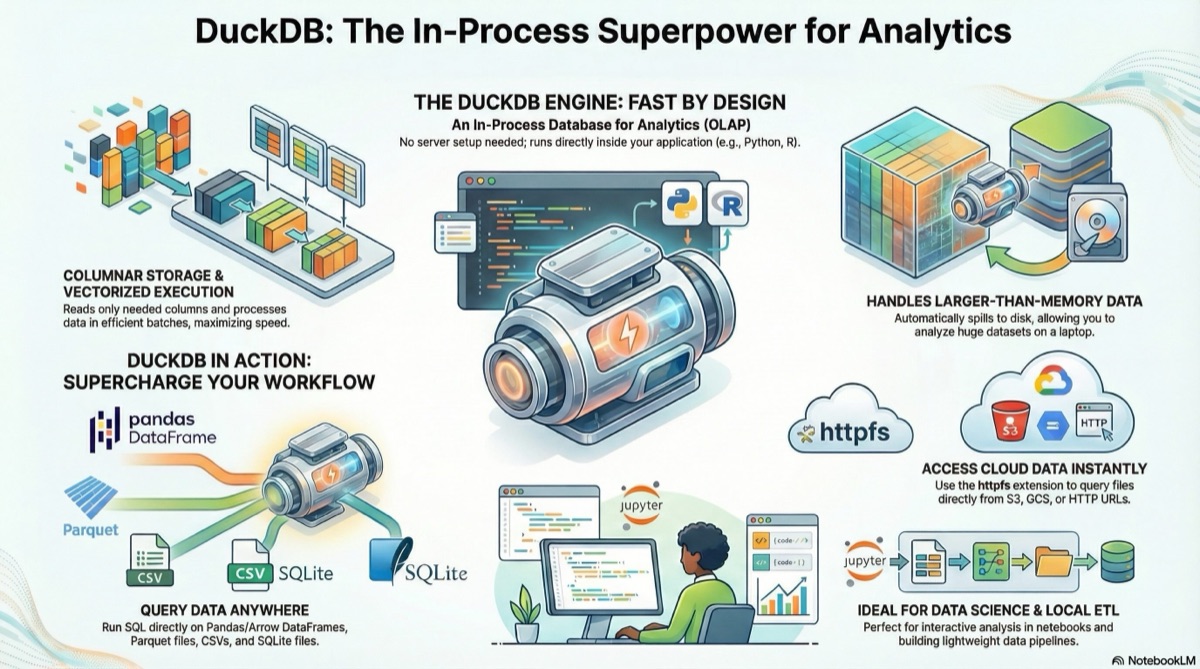
Most Python workflows begin by reading a file into a data frame. If your file is bigger than your RAM, the read will fail. DuckDB sidesteps that by treating your files — CSV, JSON, Parquet, or even remote HTTP/S3 objects — as tables that can be queried directly with SQL. Internally, it works in two key ways:
-
Column-by-column streaming: DuckDB reads only the columns you reference in your query, and it does so in small chunks. If you run
SELECT city, AVG(sales) FROM 'sales.parquet' GROUP BY city;DuckDB never accesses the other 50 columns in the file, reducing I/O and memory usage. -
On-the-fly parsing: Instead of loading the entire file into memory, DuckDB parses and processes each chunk as it streams through. It is why you can run a query against a 10 GB Parquet file on a laptop with 8 GB of RAM — it’s never holding the entire file in memory at once.
Because of this, you can even query data stored in cloud buckets without downloading it first. DuckDB’s HTTP/S3 extensions allow you to point a SQL query at a URL, and it will stream the necessary columns over the network. For example:
SELECT COUNT(*)
FROM 'https://example-bucket.s3.amazonaws.com/large_dataset.parquet'
WHERE status = 'Active';
Under the hood, DuckDB fetches only the Parquet pages needed to evaluate status = 'Active' and to count the matching rows. This “scan-on-demand” approach is what makes DuckDB so powerful for exploring large datasets locally — it eliminates the need for ETL steps and lets your laptop act like a mini data warehouse.
2. An embedded analytics engine at your fingertips
Most databases are separate services: you install them, run a server process, and connect via a client. DuckDB flips this around by being an in-process database. You import it as a library in Python, R, JavaScript, or many other languages, and it runs inside your application. This architecture offers three notable advantages:
-
Zero setup, immediate results. There’s no daemon to configure, no port to open. You can create a database file or operate entirely in memory with a single command. For scripting, this means you get the power of SQL without the operational burden of running Postgres or MySQL.
-
Rich SQL dialect for analytics. DuckDB supports full ANSI-compliant SQL, including window functions, common table expressions (CTEs), complex joins, and aggregations. Many analytical tasks that require several lines of pandas code can be expressed as a single, efficient SQL query. Because DuckDB is designed for analytics (OLAP), its query planner and execution engine are tuned for scans, joins, and aggregations rather than transactional workloads.
-
Portability. Because it’s a small library, you can bundle DuckDB into notebooks, command-line tools, or embed it in larger applications. Even on websites, if you use DuckDB WASM. Its file format is self-contained; you can ship a DuckDB database as a single file and open it on any platform, making it a handy tool for reproducible research or for sharing results with colleagues.
3. Handling data bigger than your memory
When you sort or join large tables in pandas, everything has to fit in RAM. If it doesn’t, you get an out-of-memory error. DuckDB’s query engine implements out-of-core algorithms: when a query operation needs more memory than is available, the engine writes intermediate results to disk (spill files) and processes them in phases. This method is how it can, for example, sort a 50 GB table on a machine with 16 GB of RAM.
DuckDB’s scheduler breaks operations into chunks and pipelines them through operators. For GROUP BY a column with millions of unique values, it will hash intermediate groups in memory until a threshold is reached, spill the partial aggregates to disk, and then merge them in a final phase. Because the format on disk is binary and columnar, merging these spill files is still efficient.
This approach isn’t new — database systems have done it for decades — but having it inside an embeddable library is novel. It lets you solve problems that used to require a distributed system like Spark, but without leaving your laptop. The trade-off is that disk I/O is slower than memory, so queries that spill to disk take longer; however, they succeed rather than crash.
4. Seamless integration with your existing tools
A common frustration when moving between tools is the cost of converting data formats. DuckDB addresses this by implementing a zero-copy interface to Apache Arrow. Arrow is a columnar in-memory format used by pandas (via PyArrow), Polars, and many other libraries. When you run a query in DuckDB and ask for the result as an Arrow table, DuckDB returns a pointer to its own columnar buffers without copying any bytes. Conversely, you can register an existing pandas or Polars DataFrame as a DuckDB table and query it directly.
This interoperability unlocks powerful patterns:
-
Join a massive Parquet file on disk with a small in-memory DataFrame without loading the big file into pandas.
-
Use SQL to do the heavy lifting — complex filtering, grouping, joining — and hand the result to pandas for plotting or to scikit-learn for modelling.
-
Stream results into data-visualization tools or dashboards that understand Arrow.
Because DuckDB can also output results as pandas, Polars, or even CSV/Parquet, it becomes a flexible glue layer in your data stack, rather than forcing you to adopt a new tool for everything.
5. Designed for speed: columnar storage and vectorized execution
DuckDB’s performance stems from borrowing ideas from modern analytics databases and packaging them in a lightweight library. Two design choices are key:
-
Columnar storage. In a traditional row-oriented database, each row’s fields are stored contiguously. This method is efficient for transactional systems that insert or update single rows, but wasteful for analytics where you read a few columns across many rows. DuckDB stores each column in its own contiguous blocks, often compressed. When you run
SELECT SUM(price) FROM sales, DuckDB reads only thepricecolumn from disk, decompresses it, and ignores the rest. It dramatically reduces I/O. Columnar storage also allows different compression schemes to be applied to each column (e.g., dictionary encoding for strings, run-length encoding for booleans), boosting performance and reducing file sizes. -
Vectorized execution. Traditional database engines use the “row-at-a-time” (volcano) model: each operator pulls one row at a time from the previous operator. DuckDB instead uses a “vector-at-a-time” model: operators process chunks (vectors) of thousands of values at once. It aligns with CPU caches and SIMD instructions, reducing function-call overhead and enabling optimizations such as pipeline fusion (combining multiple operators into a single loop). It’s similar to how libraries like NumPy operate on entire arrays rather than requiring Python loops.
Conclusion: A New Sweet Spot for Everyday Analytics
For a long time, analysts faced a stark choice: keep things simple with tools like pandas or Excel and hope the data stayed small, or jump to distributed engines like Spark to handle scale. DuckDB shows that this isn’t a binary decision anymore. By embedding a complete SQL OLAP engine right inside your scripts, you:
-
Query huge files without blowing up your memory.
-
Perform complex analytics locally, even when intermediate results spill to disk.
-
Integrate seamlessly with pandas, Polars, and Arrow, so that you can mix and match SQL with your favorite Python or R workflows.
-
Enjoy performance from modern database architecture — columnar storage and vectorized execution — without running a separate server.
This combination creates a new sweet spot in the data stack. You get the expressiveness of SQL and the familiarity of Python/R, the ability to scale beyond your RAM without spinning up a cluster, and the portability of a library you can drop into any project.
If your current workflow ever feels like it’s stretching the limits of pandas or overkill to fire up Spark, DuckDB is worth a look. It doesn’t replace every tool, but it fills a significant gap: high-performance analytics on a single machine, accessible to anyone who can write SQL. By bringing big-data capabilities back to the desktop, it invites you to rethink how — and where — you explore your data next.